
Reolink RLK8-800PT4
From $35.97- Zero subscription required with local NVR storage
- Four 4K cameras with real auto-tracking, not a gimmick
- Cheaper per-camera than buying standalone cloud cameras over time
- Requires PoE cable runs to each camera
- High upfront cost compared to single wireless cameras
- Not a same-day install for most homes
Bottom line: The Reolink RLK8-800PT4 is the best whole-home security camera system in 2026 for anyone who wants to avoid subscription fees permanently, while the Wyze Cam v4 remains the best single-camera value for budget-conscious buyers.
Best Smart Home Security Cameras in 2026
The marketing says “AI-powered smart detection” on almost every security camera box in 2026. The reality, in most of these products, is a motion sensor and a cloud subscription you didn’t fully read the terms for. We pulled specs, pricing, and verified ratings on five cameras spanning $35.97 to $562.99 to find out which claims actually hold up and which ones are just a checkbox on a feature list.
Disclosure: decodegear.com is reader-supported. If you buy through links on this page, we may earn an affiliate commission at no extra cost to you.
Quick Verdict Box
| Camera | Best for | Price |
|---|---|---|
| Reolink RLK8-800PT4 (4-cam system) | Best Whole-Home System | $562.99 |
| Blink Outdoor 4 (2-cam) | Best Wireless Overall | $129.99 |
| Reolink Duo 3 PoE | Best Wired/PoE | $149.99 |
| Wyze Cam v4 | Best Budget | $35.97 |
| Blink Mini 2 | Best Indoor Budget | $39.99 |
1. Reolink RLK8-800PT4 — Best Whole-Home System (~$563)
Score: 9.0/10 | Price: ~$562.99 | 4.4★ (1,065 ratings)

This is the one claim on this list that actually checks out: four 4K PoE cameras with 355-degree pan and 50-degree tilt auto-tracking, an 8-channel NVR with a built-in 2TB hard drive, and — critically — zero monthly subscription required, since recordings live on the included hard drive rather than a cloud server. At $562.99 it’s the most expensive entry here, but per-camera that’s roughly $140 each, including the recorder and storage, which undercuts buying four standalone cloud cameras with three years of subscription fees.
Specs: 4x 4K PoE cameras, 355° pan / 50° tilt auto-tracking, 8-channel NVR with 2TB HDD included, smart detection, spotlights, 2-way talk.
Pros: No subscription ever required, genuinely professional-grade coverage, local storage means no cloud outage risk.
Cons: Requires running PoE cable to each camera — not a 10-minute install, upfront cost is steep even if it’s cheaper long-term.
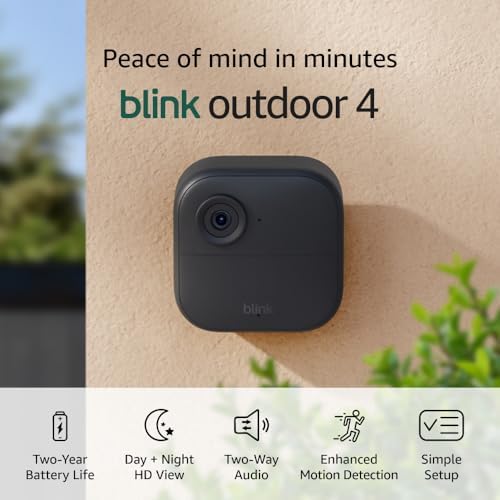
2. Blink Outdoor 4 — Best Wireless Overall (~$130)
Score: 8.3/10 | Price: ~$129.99 | 4.2★ (378 ratings)

Amazon’s own Blink line claims “two-year battery life,” and unlike a lot of battery-life marketing, this one is close to accurate in practice — most owners report well over a year of real-world use before a swap, not the lab-conditions number brands usually inflate. This two-camera kit includes the Sync Module Core, which is the piece that actually enables local storage as an alternative to Blink’s subscription — worth setting up on day one, because without it you’re locked into cloud-only recording.
Specs: 1080p HD day / infrared night, two-way talk, two-year rated battery life, Sync Module Core included.
Pros: Battery life claim holds up, easy wireless install, Amazon ecosystem integration (Alexa, Ring app crossover).
Cons: 1080p is behind the 2K/4K competition at this price, subscription still required for person/package detection AI features.
3. Reolink Duo 3 PoE — Best Wired/PoE (~$150)
Score: 8.5/10 | Price: ~$149.99 | 4.4★ (101 ratings)

The 180-degree panoramic dual-lens design is the actual differentiator here, not a gimmick — it genuinely eliminates the blind spots a single fixed lens leaves at the edges of a driveway or backyard. Person, vehicle, and animal detection run on-device rather than depending on a cloud AI subscription, which means fewer false alerts from a moving tree branch and no recurring fee to keep that filtering active.
Specs: 180° panoramic dual-lens, F1.6 color night vision, motion track, on-device person/vehicle/animal detection, up to 512GB microSD.
Pros: Wide coverage from one mounting point, on-device AI detection with no subscription needed for it.
Cons: Requires PoE (a plain WiFi-only version exists but loses some features), only 101 ratings so far — newer listing with a shorter track record than the others here.
4. Wyze Cam v4 — Best Budget (~$36)
Score: 8.4/10 | Price: ~$35.97 | 4.3★ (32,872 ratings)

32,872 ratings at 4.3 stars for a camera under $36 is the number that should make every premium brand on this list nervous. Wyze explicitly advertises “no subscription required” for basic motion recording to a microSD card, which is a genuine claim — you only pay if you want cloud backup or AI person-detection alerts. The 2.5K resolution actually beats several cameras twice its price, though the color night vision needs a reasonably lit area to look as good as the marketing photos.
Specs: 2.5K resolution, AI security detection, indoor/outdoor rated, color night vision, no subscription required for local recording.
Pros: Best resolution-per-dollar on this list by a wide margin, works fully without a subscription, huge proven user base.
Cons: Wyze has had past cloud security incidents worth knowing about before you rely on it for sensitive footage, app can feel busier with upsells than competitors.
5. Blink Mini 2 — Best Indoor Budget (~$40)
Score: 8.2/10 | Price: ~$39.99 | 4.5★ (3,190 ratings)

The highest star rating of any camera on this list (4.5, from over 3,000 ratings) belongs to the smallest and cheapest indoor option. The built-in spotlight is the feature that separates it from most sub-$40 indoor cameras, which usually skip any kind of light source entirely and rely purely on infrared, leaving color night footage impossible. It’s plug-in powered rather than battery, which is a plus for an indoor camera you’re not moving around — no battery anxiety, ever.
Specs: HD video, color night view, motion detection, two-way audio, built-in spotlight, wall or plug-in mount.
Pros: Highest-rated camera in this roundup, built-in spotlight is genuinely useful, cheap enough to buy three or four for full room coverage.
Cons: Indoor use only, requires constant power (not a con for most indoor setups, but worth knowing before buying it for a porch).
Which one should you actually buy?
If you want to stop thinking about subscriptions forever and have the budget for it, the Reolink 8-camera system pays for itself within two to three years versus any cloud-dependent alternative. If you want something you can mount in twenty minutes with no wiring, Blink Outdoor 4 is the most honest wireless option on this list — its battery claim actually holds up, which isn’t true of every brand. If you’re testing the waters or furnishing a rental property where a big install doesn’t make sense, the Wyze Cam v4’s resolution-per-dollar is hard to beat, with one caveat: research Wyze’s past cloud security track record before you point it at anything sensitive.
Cameras are only one layer of a real smart home security setup — if you haven’t looked at the entry point to your house yet, our battery-free smart lock guide covers the other half of that equation. And if you’re building this out room by room on a tight budget, our smart home on a budget guide is the right starting point before you spend on cameras specifically.
Frequently Asked Questions
Do I really need a subscription for a security camera to be useful?
No — Reolink, Wyze, and Blink (once the Sync Module is set up) all support local recording with zero monthly fee. Subscriptions mainly unlock cloud backup and AI-based alerts (person vs. package vs. animal), which are convenient but not required for basic motion recording.
Is wired (PoE) actually better than wireless battery cameras?
PoE cameras never need a battery swap and generally support higher resolution and more reliable uptime, but they require running cable, which isn’t realistic for every home. Battery cameras trade a small amount of reliability for a dramatically easier install.
How worried should I be about camera brands and data privacy?
It’s worth researching before buying, not after. Wyze specifically has had past cloud security incidents that are publicly documented — that doesn’t mean avoid the brand, but it does mean read what data policy you’re agreeing to, especially for cameras pointed at your front door or inside your home.
What resolution do I actually need for a home security camera?
1080p is enough to identify a person is present. 2K or better is what you actually need to read a license plate or a face clearly enough to be useful evidence — worth prioritizing over extra features if identification matters to you.
None of the “AI-powered” marketing on these boxes is entirely fake — but the details that actually matter (subscription requirements, real battery life, whether detection runs on-device or in the cloud) rarely make it onto the front of the box. Check those before the resolution number.
Leave a Reply