Prime Day is over, but the smart-shopping mindset shouldn’t be. Some upgrades deliver so much value that they’re worth buying almost any time of year — and several of these categories see steady discounts long after the big sale ends. In fact, price-tracking data consistently shows that many “Prime Day deals” return within weeks, sometimes at lower prices. Here are ten upgrades that consistently pay for themselves, what to look for in each, a specific model worth starting your search with, and when each category typically hits its real lows.
Everyday upgrades that pay off
1. A good power bank
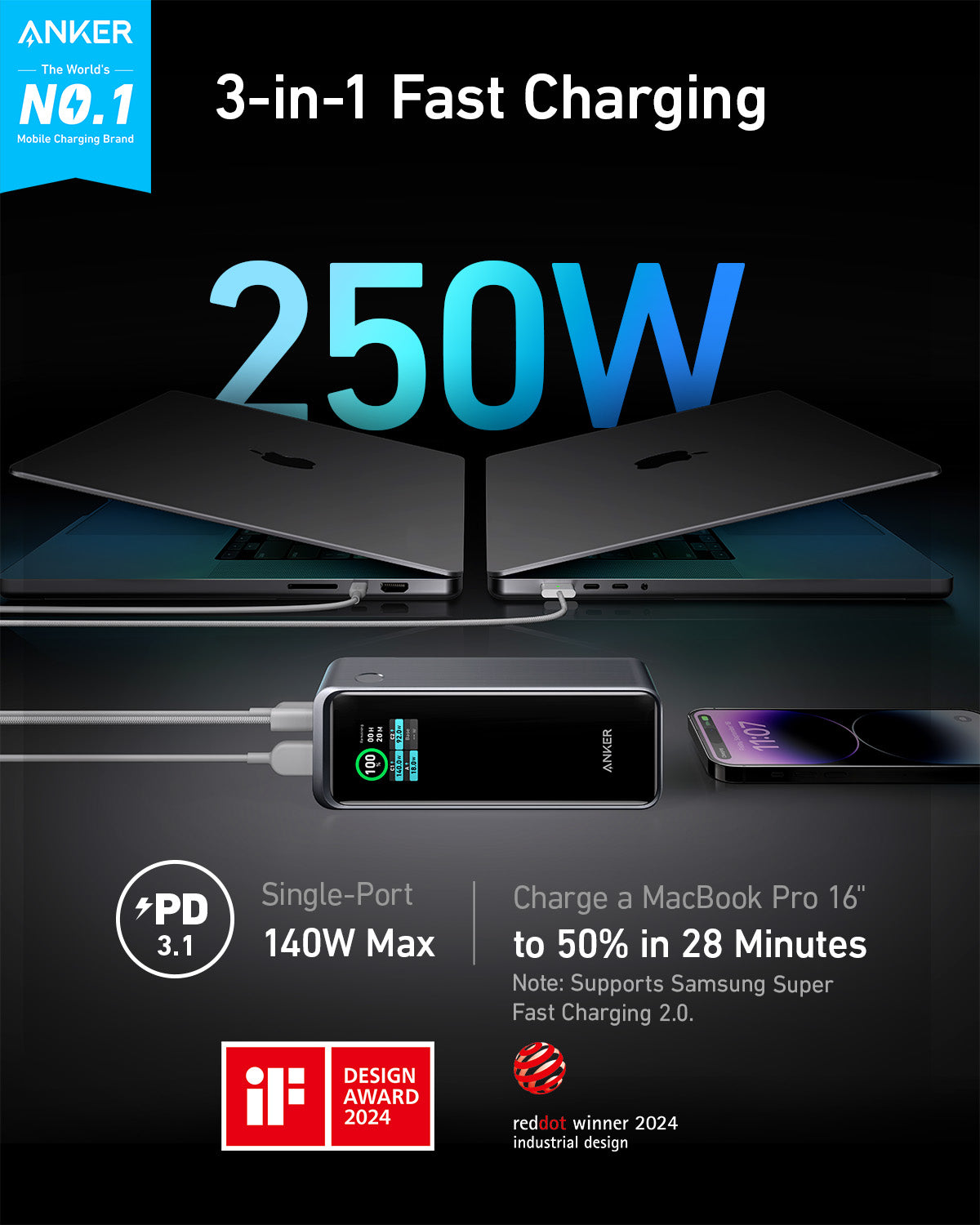
The cheapest way to end battery anxiety. Look for at least 10,000 mAh (enough for two full phone charges) and USB-C Power Delivery so it can fast-charge your phone and even top up a laptop. Avoid no-name brands with inflated capacity claims — a reputable 20,000 mAh pack is the travel sweet spot.
Our pick: the Anker 737 Power Bank (around $110) hits 140W output, enough for most laptops, and its built-in display shows exactly how much juice is left. If you just need phone top-ups, a basic Anker 10,000 mAh pack runs around $20–$30 and drops even lower several times a year.
2. A mesh Wi-Fi system
If you have dead zones, no single router will fix them as well as a mesh kit. Two or three nodes blanket a home in consistent signal. For most homes, a Wi-Fi 6 mesh is plenty; Wi-Fi 7 is worth it only if you have a multi-gig internet plan and lots of devices.
Our pick: a TP-Link Deco X55 three-pack (around $150) covers roughly 6,500 square feet and handles gigabit plans without breaking a sweat. Mesh kits are heavily discounted around back-to-school season, so this is one category where waiting a few weeks often pays. And before you spend anything, it’s worth ruling out congestion problems — our guide on why Wi-Fi slows down at night covers the fixes that cost nothing.
3. An NVMe SSD
The single best speed upgrade for an aging laptop or PC. Swapping a hard drive (or even an older SATA SSD) for an NVMe drive makes boot times, app launches, and file transfers dramatically faster — often more noticeable than a new processor. A 1TB drive is the value pick.
Our pick: the Samsung 990 EVO Plus 1TB sits around $70–$80 and is fast enough that you’d need benchmarks to tell it apart from drives costing twice as much. Gamers with a PS5 or a gaming PC can step up to the WD Black SN850X for around $90. NAND flash prices move in cycles, so SSDs regularly dip below their Prime Day prices with no sale event at all.
4. A USB-C hub or dock
Turns one port into a full desk: extra USB ports, HDMI for a monitor, card readers, and pass-through charging. Check that it supports your monitor’s resolution and refresh rate, and that pass-through wattage is enough to charge your laptop.
Our pick: the Anker 555 8-in-1 hub (around $35–$45) covers HDMI at 4K, 100W pass-through, and card readers — the combination most laptop owners actually need. If you’re building out a full desk around it, our cable management guide shows how to keep the extra ports from turning into visual chaos.
5. A mechanical keyboard
A daily-driver upgrade you feel every minute you type. Hot-swappable models let you change the typing feel later without soldering. If you work in shared spaces, look for “silent” or linear switches.
Our pick: the Keychron V1 Max (around $90) is hot-swappable, works wired or wireless, and supports Mac and Windows layouts out of the box. On a tighter budget, the Aula F75 delivers a shocking amount of typing quality for around $50.

Home and entertainment
6. A robot vacuum
Prices have fallen hard — mid-range models with mapping and decent suction are genuinely good now, no longer a gimmick. Self-emptying base stations cost more but cut maintenance to almost nothing. This is a category where you no longer need to buy the flagship to be happy.
Our pick: the Roborock Q5+ (around $300–$400) pairs lidar mapping with a self-empty dock that holds weeks of debris. Robot vacuums see some of the deepest non-Prime discounts of any category here, especially around Black Friday, when flagship-level features routinely land in the mid-range price bracket.
7. A soundbar
The fastest fix for thin, tinny built-in TV speakers. Even an entry-level bar is a night-and-day improvement for dialogue clarity. If you want cinematic sound, look for one with a wireless subwoofer; Dolby Atmos matters mainly if your room suits it.
Our pick: the Hisense HS214 (around $80) is the budget standout with a built-in subwoofer, while the Samsung HW-Q600C (around $250–$350) adds a real wireless sub and Atmos for mid-size living rooms.
8. Smart bulbs
Cheap, and the easiest entry into a smarter home — schedules, voice control, and scenes with no rewiring. Buy Matter-compatible bulbs so they work across Alexa, Google, and Apple and you’re not locked into one app.
Our pick: TP-Link Kasa Matter bulbs run around $10 per bulb in multi-packs and cover schedules, dimming, and full color. Philips Hue remains the premium option, but for most people the price gap buys nothing you’ll notice day to day.
9. A 1440p monitor
The current sweet spot for work and play: much sharper than 1080p without the GPU demands (and price) of 4K. For general use a 27-inch IPS at 1440p is ideal; gamers should look for a 144Hz-plus refresh rate.
Our pick: the Gigabyte M27Q (around $250) checks every box — 27-inch IPS, 1440p, high refresh — and doubles as a KVM switch if you juggle a work laptop and a personal PC. Monitor prices erode steadily throughout the year, so there’s rarely a reason to panic-buy one during a sale event.
10. Wireless earbuds
Strong options now exist at every price. Mid-range pairs offer genuinely good active noise cancellation that used to be flagship-only. Prioritize fit and battery life over exotic codecs unless you’re an audiophile.
Our pick: the Anker Soundcore Space A40 (around $50–$60) delivers ANC and multipoint pairing that embarrass earbuds twice the price. If you’re not sure what actually matters at each price tier, our full wireless earbuds buying guide breaks it down feature by feature.
How to actually save (without Prime Day)
The real skill isn’t catching a sale — it’s knowing whether a “deal” is real. Three habits do the heavy lifting:
- Use a price-history tracker before buying, so you can see whether today’s price is genuinely low or a markup-then-discount trick. A “40% off” on an inflated price is no deal at all.
- Know the calendar. Many of these categories hit their true lows during back-to-school (July-August) and Black Friday (late November), not necessarily on Prime Day. If it’s not urgent, set a price alert and wait.
- Apply the “was I going to buy this anyway?” test. Spending money to “save” money is the oldest trap in retail. A discount is only a saving if you needed the item in the first place.
Buy for genuine need, verify the price is real, and time it to the calendar — do that and you’ll consistently beat the people who only shop when a banner tells them to. For help deciding what’s actually worth it, browse our latest guides.
Quick FAQ
Do prices really come back after Prime Day?
Usually, yes. Most of the categories above — SSDs, earbuds, power banks, smart bulbs — cycle through comparable discounts every few weeks. The genuinely rare deals tend to be on current-generation flagships, and even those return by late November.
Which of these upgrades has the biggest impact per dollar?
For an older computer, the NVMe SSD, by a wide margin — it can make a five-year-old laptop feel current for well under $100. For everything else in your day, the power bank and the soundbar deliver the most noticeable improvement for the least money.
Should I wait for Black Friday instead of buying now?
Only if the purchase can wait four-plus months and the item is a big-ticket one, like a robot vacuum or a premium monitor. For sub-$100 gear, the difference between today’s normal price and the November low is usually $10–$20 — not worth months of doing without.
Deixe um comentário