
Most laptop buying guides hand you a spec sheet and wish you luck. That would’ve worked in 2023. It won’t work now, because 2026 quietly rewrote three of the rules that used to make laptop shopping simple — RAM pricing, what “AI PC” actually means, and how much of your storage speed you’ll ever really use. Knowing how to buy a laptop in 2026 means understanding those three shifts first — get them wrong and you’ll overpay for numbers that don’t matter, or underspend on the one spec you can’t fix later.
What you’ll learn: which specs are worth paying for in 2026, why laptop RAM suddenly got expensive (and what that means for your budget), and the exact red flags that separate a smart buy from a laptop you’ll be replacing in 18 months.
Start With What You’ll Actually Do With It
Before any spec talk: write down the three things you do most on a laptop. Browser tabs and video calls need a different machine than 4K video editing, and a “gaming laptop” spec sheet is wasted money if you never open a game. The market in 2026 splits cleanly into four lanes — everyday productivity, business/portability, creative work, and gaming/high performance — and the CPU, RAM, and battery targets below shift depending on which lane you’re in.
The Specs That Actually Matter in 2026
Here’s where most guides get lazy and just list numbers. The numbers changed this year, and so did what they mean.
CPU: pick the class, not the clock speed
Three chip families dominate 2026 laptops: Intel’s Core Ultra Series 2 (“Lunar Lake” in the efficient thin-and-lights), AMD’s Ryzen AI 300 series (the Ryzen AI 9 HX 370 is the one you’ll see most), and Qualcomm’s Snapdragon X in ARM-based ultraportables. For creative or premium work, Apple’s M4/M4 Pro/M4 Max still sets the bar for battery life and thermals. At the performance ceiling, Intel’s Core Ultra 9 285HX and AMD’s Ryzen 9 9955HX3D show up in the handful of laptops built for heavy workloads. Anything below these tiers in a brand-new 2026 machine is a chip that was already old when the laptop shipped.
RAM: 16GB is the new floor, and it’s not optional anymore
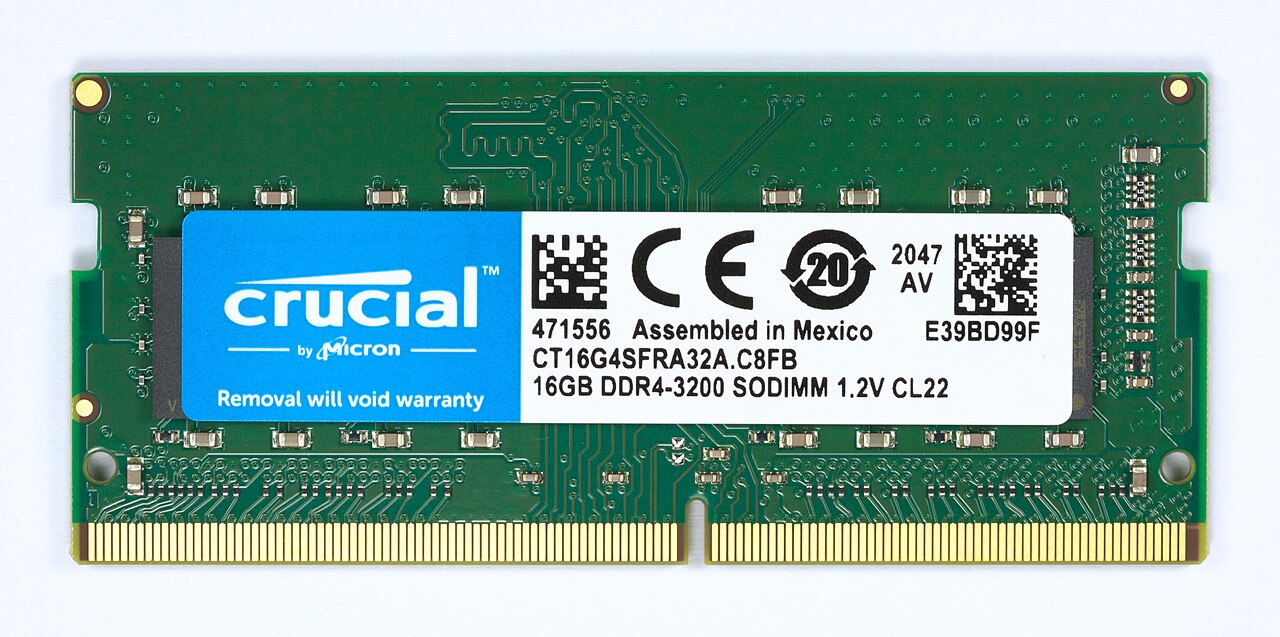
16GB has replaced 8GB as the realistic minimum for a laptop you expect to keep for three-plus years. You’ll still find 8GB machines under $600, but treat that as a hard limitation, not a starting point — it’s the first thing that turns a “fine” laptop into a frustrating one. If you plan to run any AI model locally rather than through a browser, budget for 32GB instead.
Here’s the part most guides won’t tell you: RAM got a lot more expensive this year, and it’s not a fluke. Analysts at Gartner are tracking a combined ~130% rise in DRAM and SSD pricing through the end of 2026, which is pushing average PC prices up roughly 17%. The cheapest 32GB DDR5 kit in the US went from $80–120 a year ago to $374.97 in June. The cause isn’t laptop demand at all — memory makers are reallocating wafer capacity away from consumer DDR5 and toward the high-bandwidth memory (HBM) that feeds AI datacenter GPUs, because HBM can be up to 10x more profitable per wafer. Framework, the DIY-upgrade laptop maker, already raised its own DDR5 upgrade pricing by 50% in response. Real relief isn’t expected before late 2027.
That timeline matters for your decision: since a growing number of 2026 laptops solder RAM in permanently, “I’ll just upgrade it later” is no longer a safe assumption — and even when it is possible, the upgrade now costs meaningfully more than it did last year.
Storage: NVMe beats SATA, but not by as much as the marketing implies
A SATA SSD tops out around 550 MB/s. A mid-range NVMe PCIe 4.0 drive delivers 5,000–7,000 MB/s, and a top-tier PCIe 5.0 drive clears 12,000 MB/s on paper. In real, everyday use — not synthetic benchmarks — that gap shrinks to roughly 3.7x, because most tasks mix small reads with CPU-bound work where storage speed stops being the bottleneck. The practical takeaway: NVMe should be your default for the boot/OS drive on any new laptop, but don’t pay a premium chasing PCIe 5.0 numbers you’ll rarely hit outside of large file transfers.
NPU and “AI PC”: know what the number actually promises
For Copilot+ PC features and on-device AI tasks, the baseline is 40+ TOPS (trillion operations per second), met by Intel’s Core Ultra 200V chips, AMD’s Ryzen AI 300 series, and Qualcomm’s Snapdragon X Elite. But a TOPS number by itself doesn’t tell you whether the experience is good — it says nothing about memory bandwidth, GPU performance, thermal throttling under sustained load, or whether the app you actually use even calls the NPU. Treat 40+ TOPS as a minimum spec to unlock features, not proof the laptop will feel fast.
How to Buy a Laptop in 2026 by Budget Tier
Average Windows laptop pricing has already crossed $750, pulled up by AI-capable Copilot+ hardware working its way into the mid-range. Here’s how the tiers actually shake out in 2026:
Under $600: Covers everyday browsing, streaming, and light photo editing with a Core i5/Ryzen 5, 8GB RAM, and a 512GB SSD — but you’re making real concessions on RAM and future upgradability. Go in with eyes open.
$500–900: The sweet spot for cost-conscious buyers who still want decent specs — this is where the RAM/CPU/storage triangle above starts to balance properly.
$900–1,500: Where most buyers find the real cost-to-performance balance. A machine like the ASUS Zenbook S 14 OLED (Ryzen AI 9 HX 370, 14″ OLED, around $1,099) is a good example of what this tier now buys — it beats comparable Intel ultrabooks on price for similar AI workloads.
$1,500+: Premium territory — top-tier CPUs, best-in-class displays, and the thermal headroom to sustain performance under load.
Pro Tip: Buy for the RAM Crisis, Not Against It
With DRAM and SSD pricing expected to stay elevated through 2027, “wait for prices to drop” isn’t a strategy right now — it’s a way to keep overpaying while getting less. Since more 2026 laptops solder memory in permanently, the smarter move is deciding your RAM and storage needs at the point of purchase, not after. If AI features or heavier multitasking are even a maybe for you, size up on RAM now rather than betting on a future upgrade that’s already 50%+ more expensive than it was a year ago.
If you’d rather skip the spreadsheet entirely, our best budget laptops under $600 roundup applies this exact framework to specific picks. And if the RAM situation above raised your eyebrows, we go deeper on why DDR5 prices spiked in 2026 — worth reading before you finalize any purchase.
Want a laptop with real upgrade headroom instead of soldered memory? 🛒 See upgradeable 16GB+ laptops on Amazon
What Most People Miss: The NVMe vs. SATA Trade-off Isn’t Just Speed
Buyers fixate on the speed gap and forget the other side of the trade: SATA drives are still meaningfully cheaper per gigabyte. If your budget forces a choice between a smaller NVMe drive and a larger SATA one, the NVMe drive is usually still the right call for your boot/OS volume — but if you need bulk storage for media libraries, a secondary SATA or external drive is a legitimate way to stretch your budget without touching the specs that affect daily responsiveness. We cover this trade-off directly in our NVMe vs SATA vs external SSD guide.
Frequently Asked Questions
Is 8GB of RAM enough for a laptop in 2026?
Only for the lightest use — basic browsing and document editing with few tabs open. For anything involving multitasking, AI features, or a laptop you want to keep three-plus years, 16GB is the realistic floor.
Why did laptop RAM get so expensive this year?
Memory manufacturers shifted wafer capacity away from consumer DDR5 toward the high-bandwidth memory used in AI datacenter GPUs, which is far more profitable per wafer. That squeeze pushed DDR5 kit prices up roughly 3x in a year, with no real relief expected before late 2027.
Do I need a laptop with an NPU and 40+ TOPS?
Only if you actually use Copilot+ features or on-device AI tools. The TOPS number unlocks those features but doesn’t by itself guarantee a faster or better everyday experience — check the rest of the spec sheet too.
Should I wait for laptop prices to drop before buying?
Based on current DRAM/SSD pricing trends, no — analysts expect prices to stay elevated through 2027. If you need a laptop now, buying with the right RAM and storage specs today is generally smarter than waiting for a price drop that isn’t coming soon.
The laptop market in 2026 rewards buyers who understand why prices moved, not just what the spec sheet says. Get the RAM and storage decision right at checkout, and everything else on this list becomes a much easier call.
Leave a Reply